Developing an Obsidian Plugin for Garmin Connect
An open-source plugin that syncs Garmin Connect into your vault as note properties, with a dashboard on top — on the phone as well as the desktop.
Obsidian is where a lot of us keep notes. Garmin Connect is where a watch deposits everything it measured about you. The two have nothing to do with each other, which is the problem: the numbers describing your own body sit in an app you can read but cannot query.
So we built a plugin that moves them. It signs in to Garmin Connect, writes each day's metrics into your vault as note properties, and draws a dashboard on top of them. It is open source, and it runs on mobile as well as on the desktop — which turned out to be the hard part.
Three things stood in the way.
Garmin has no public API
Garmin's developer programme exists, but it is aimed at established businesses: you apply as a company, not as someone who would like their own step count. For an individual there is no key, no OAuth app, no documented endpoint.
What there is instead is a mobile app that authenticates against
sso.garmin.com and then calls the same API the website does.
cyberjunky/python-garminconnect
is the reference implementation of that flow, and since its rewrite it signs in
the way the app does: a JSON POST to /mobile/api/login, then a service-ticket
exchange for OAuth2 bearer tokens. No OAuth1, no request signing. It ports to
TypeScript cleanly.
The part that nearly killed the project was the front door. python-garminconnect
installs curl_cffi to forge TLS fingerprints, and sleeps ten to twenty
seconds before a login POST so Cloudflare's WAF does not score the burst as a
bot. Inside Obsidian you get requestUrl — Electron's network stack on the
desktop, the operating system's HTTP client on mobile — and you do not get to
choose your fingerprint.
So before writing anything else, we measured it. A probe asks a TLS echo service what this platform looks like on the wire, then attempts a real sign-in.
| Platform | HTTP stack | JA4 prefix | Login POST |
|---|---|---|---|
| Desktop | Electron | t13d1516h2_… | 200 SUCCESSFUL |
| iOS | OS HTTP client | t13d2013h2_… | 200 SUCCESSFUL |
Both got through, including the desktop's — which is Chromium TLS carrying an
iPhone User-Agent, an obvious mismatch Cloudflare declined to punish. Garmin
is not enforcing TLS fingerprinting on /mobile/api/*. The human-facing sign-in
page at /portal/sso/en-US/sign-in, meanwhile, returns a 403 challenge even to
plain curl. The two paths live in different protection buckets.
That is a server-side policy, not a promise. Garmin can tighten it any day and there would be no workaround from inside Obsidian, so an edge refusal is surfaced as its own error rather than a generic "sync failed".
It has to run on a phone
Obsidian on a phone is a WebView. No https module, no BrowserWindow, no
tough-cookie, no axios. Anything reaching for them loads fine on your laptop
and throws on your phone, which is where it is hardest to debug.
The prior art is Garmin Health Sync,
which gave us the idea in the first place. It authenticates through an Electron
BrowserWindow, so it ships as isDesktopOnly: true. Mobile was the gap.
The fix is a seam rather than a library. HTTP is injected: the Garmin code
depends on a one-method interface, and three things implement it — requestUrl
in the plugin, fetch in a Node harness, and a fixture transport that replays
recorded responses in tests. The Garmin logic never learns which one it has.
export interface HttpClient {
  request(req: HttpRequest): Promise<HttpResponse>;
}
The tempting alternative — build node-garminconnect first, consume it from the
plugin second — fails for exactly this reason. A Node library bakes in Node
assumptions you then cannot take back out for a WebView. Starting
transport-agnostic gets you both, and it is why the whole auth and sync layer is
testable with no Obsidian in the room at all.
›Two things requestUrl does that will cost you an afternoon
It throws on any status ≥ 400 unless you pass throw: false — and a 403
body is precisely what you need when you are diagnosing a bot challenge.
It keeps no cookie jar, and its headers is a flat
Record<string, string>, so the seven Set-Cookie values Garmin returns arrive
glued into one comma-joined string. Cookie expiry dates contain commas too, so
a naive split mangles them; we split only on a comma followed by a name=.
The build enforces the rest: npm run build fails if a node or electron require
leaks into the bundle.
Raw numbers aren't worth much
Pulling data in is the easy half. A folder of JSON tells you nothing.
Two things fix that. First, metrics land as note properties rather than prose, so Dataview and Bases can query them — and the plugin generates a Bases table view beside the notes on the first sync that writes anything.
# Garmin/2026-09-12.md
---
date: 2026-09-12
steps: 8432
resting_hr: 48
sleep_hours: 7.5
body_battery_high: 88
hrv_avg: 42
training_readiness: 71
---
Second, a dashboard.
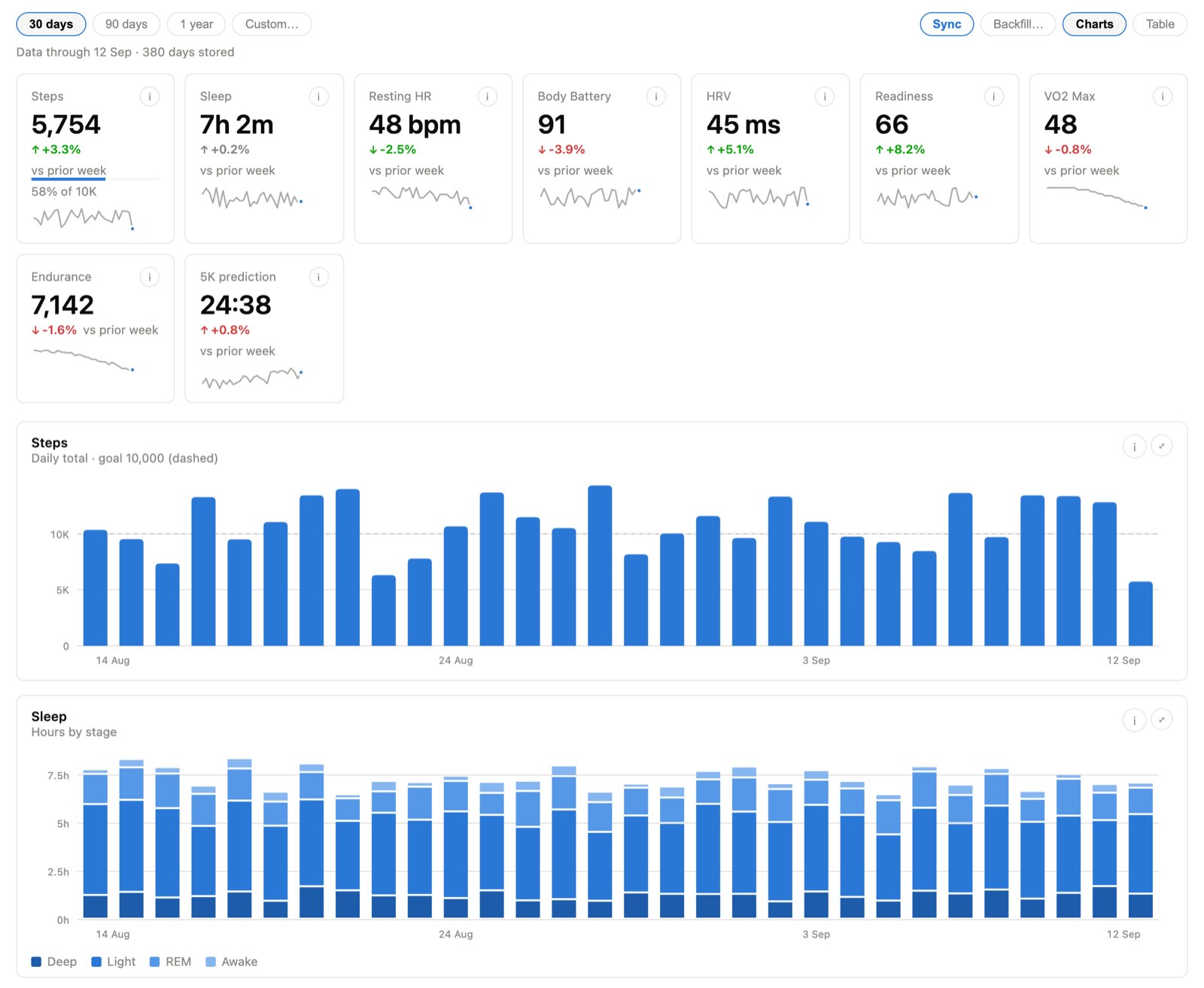
A few decisions here are easy to get wrong:
- Sleep stages take one hue in four steps, not four colours. Deep → light → REM → awake is an ordered scale; four categorical hues would encode order as identity.
- No dual-axis charts anywhere. Two measures at different scales get two charts. Resting HR, HRV, Body Battery and readiness are small multiples with one axis each.
- Deltas know which way is good. A falling resting heart rate is green and a rising one is red — the opposite of steps. They compare the last seven days against the seven before, because a single day of Garmin data swings too much to be a trend.
- Colour never carries meaning alone. Every chart has a legend or an arrow, and a table view as its twin.
The charts are hand-drawn SVG. A plugin cannot load external scripts, and a bundled chart library would be dead weight on a phone. The components are Svelte 5 and import nothing from Obsidian, which is what lets the entire dashboard mount in a plain browser — the screenshot above is that harness, not a crop of the app.
What it doesn't do yet
Two-factor authentication. verifyMfa() is written and typechecked but has
never run, because the test account is never challenged, so signing in raises a
specific error rather than pretending to handle it. If your Garmin account has
MFA switched on, wait for the next release.
One caution, since it is the sort of thing you only learn the hard way: Garmin limits login attempts per IP and can lock an account after repeated failures. Sign in deliberately. Your password is used for that one request and never written anywhere — but the refresh token that is stored is durable account access sitting in a vault you sync, so sign out from settings when you are done with a device.
Acknowledgements
- Garmin Health Sync, for the idea and for the lesson about how much you can do with file properties and daily notes. We wanted headless authentication and one plugin for both platforms; the starting point is theirs.
- cyberjunky/python-garminconnect, one of very few Garmin Connect libraries and the only actively maintained one we know of. It is Python, but the logic is what got us moving.
- health-md, for showing us what health visualization widgets should feel like in a note.
- The Obsidian community, for the support and the beta testing.